
FORTNITE SHOP TOKEN.PLAN YOUR CHEST RUNS.
Plan your Fortnite Shop Token hunt with chest routes, a loop timer, and automatic opening estimates. Set a daily budget, complete your route, and track progress without counting every chest by hand.
No account needed · Records saved in this browserHow to get a Fortnite Shop Token
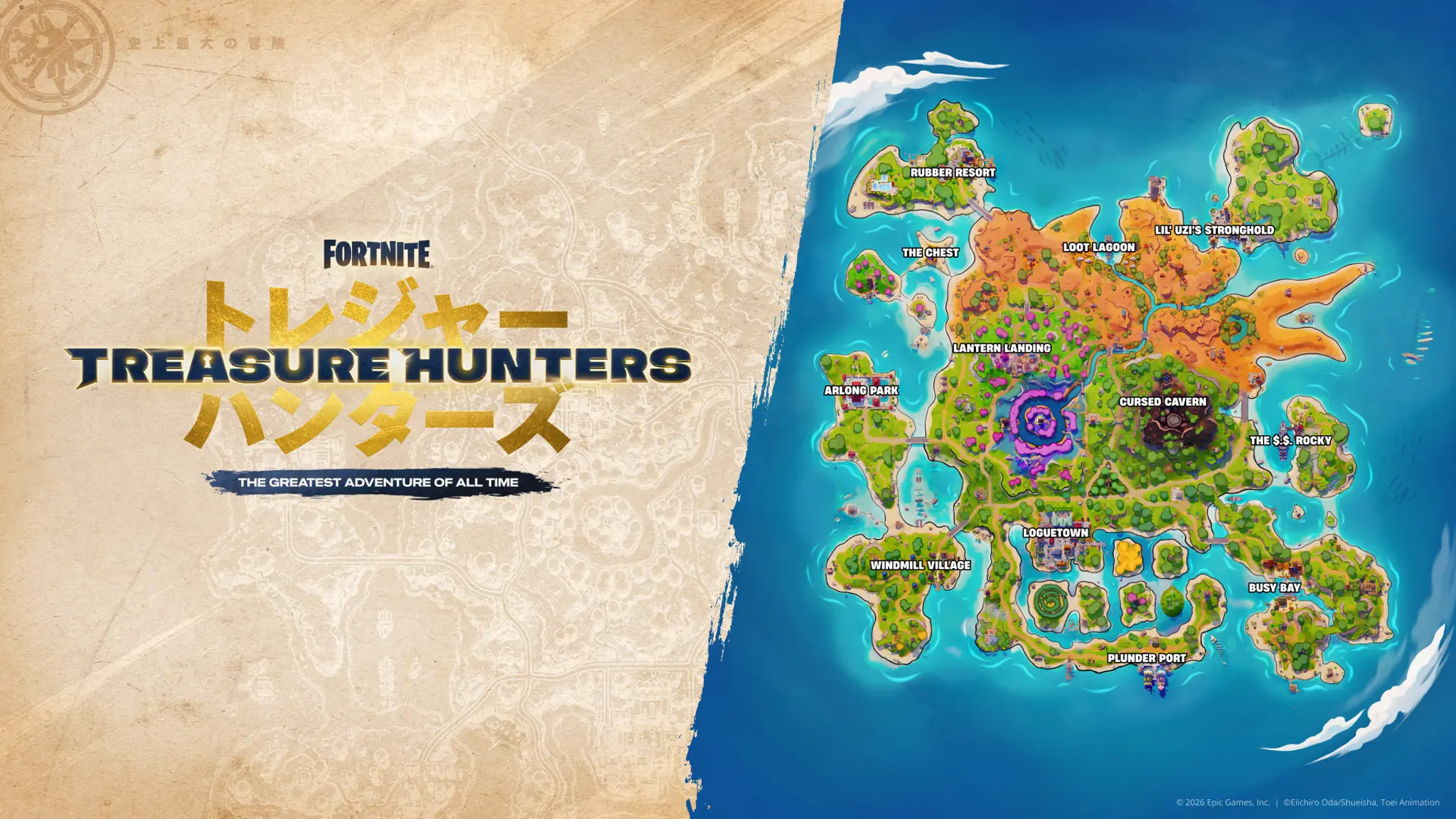
GamesRadar+ reports that searching chests during Treasure Hunters can award Pirate Shop Access. It is a random drop, so no chest total guarantees a token.
- Pick your chest routeChoose a suggested loop or use the chest map.
- Search, then recordComplete the area sweep and mark a loop. Your estimate updates automatically.
- Plan your accessFound it? Check the reward rules and activation planner.
Loading your local workbench…
Track completed chest loops
Start the timer and record completed loops. Together: count the shared route once. Split up: track each teammate’s separate area. Paused time is excluded.
Your next run starts here.
Each route estimate × its completed loops. Add separate areas once for team progress.
Estimate your remaining chest runs
Save a run to update your estimated chest total, route pace, and remaining loops. Your daily plan uses your recorded time rather than an assumed farming speed.
0 / 30 min budget
Measure it with your first run
30 budget minutes left
Save a run to estimate the plan
Save a timed loop to estimate your pace. No route speed is assumed before your first session.
Your Fortnite Shop Token calendar
Every saved run appears on its date. Keep your hunt moving through the activity window.
November 2026
November 1, 2026
0 runsNo runs saved for this day yet.
The treasure hunt begins ↗Apply a route and finish any active run to add a dated record.
Daily target divides your remaining goal across the activity dates left, including today. Counts and the Dec 5 planning endpoint are estimates; exact event time is unannounced. Runs use this browser’s local dates.
Your chest-run history
Save your first chest run
Complete a timed loop or log a previous session. Your route, completed loops, estimated chests, and active time will appear here and inform your next plan.
Before your next token hunt
Is Pirate Shop Access the same as a Fortnite Shop Token?
This planner uses “Fortnite Shop Token” for the token hunt discussed on this site and “Pirate Shop Access” when referring to the access shown in the game. If you find one, check the wording and terms on your own screen before planning what to claim. The planner helps organize chest runs; it does not issue tokens, activate access, or connect to your Epic account.
Which chest farming route should I choose?
Pick one of the suggested routes on this workbench. Recommendations compare estimated chests per minute using map distance and area search costs. For more control, use the chest map to adjust your loop time, starting area and cost assumptions. A matching YouTube area guide appears after selection; its exact path may differ from the calculated route. Start with an area you know and can search consistently. A route with more estimated chests may also involve more travel, missed rooms, or interruptions. Try a short loop first, record its active time, and repeat it before comparing another route. Your saved pace can help you decide which route fits your available playtime. A larger map total alone does not establish a faster route or better token odds. You can build a chest farming route on the map.
How are estimated chest totals calculated?
The tracker adds the approximate chart counts for the full areas in your selected route, then multiplies that total by completed loops. Count a loop after completing the full selected sweep, rather than just passing through those areas. For example, Windmill Village and Arlong Park have a combined estimate of 59 chests. Completing that route three times records approximately 177 chests. These are planning estimates rather than confirmed openings. When searching together, count the shared route once, regardless of team size. When splitting up, assign different areas and add each teammate’s route estimate multiplied by their own completed loops. Unfinished loops add no openings. Each session keeps its original routes, team size, and counting style, so later changes do not rewrite earlier records.
Does playing in a squad improve my Fortnite Shop Token chance?
GamesRadar reports that a find is shared with the current duo, trio, or squad. This planner estimates that shared chance from total unique team openings, using the same 1 in 2,000 estimated per-chest assumption. Splitting into separate areas can add opportunities; following teammates through the same route does not multiply its chest count. Battle Royale and Zero Build remain available. Beebom reports finds in both modes. These reports do not establish an official drop rate. Records stay in this browser and do not sync automatically with teammates.
What if I only complete part of a route?
Count a loop only after completing the route you intended to search. If the storm, opponents, or another interruption makes you leave early, avoid recording a full loop for that partial run. Add a field note explaining what happened. You can save time with zero completed loops, which records the effort without adding a full route’s estimated chest yield. Before saving, review both completed loops and active time.
Can the Fortnite Shop Token planner increase my odds?
The planner does not change the game’s drop rate. Its purpose is to help you organize routes, reduce planning work, and understand how much chest-searching activity fits your schedule. Under a fixed independent-chance model, more eligible openings increase the cumulative chance of a find. That is different from making each chest more likely to award a token. Neither a fast route nor a completed chest goal guarantees a reward.
What should I do after finding Pirate Shop Access?
Mark the find in your saved run, then review the access details in Fortnite. Use the activation planner to compare a possible access window with announced events and Shop arrivals. Review the reward rules before deciding what to claim. The event calendar is a planning reference, and an announced arrival does not guarantee that an item will remain available or qualify for your access. Your in-game terms and displayed expiry take priority.
Will my chest-run records survive a refresh?
Your plan, saved sessions, and unfinished timer are stored in this browser when browser storage is available. Running timers continue across refresh, while paused timers stay paused. Export a backup if you want a separate copy. Records do not automatically sync between devices, and clearing site storage can remove your local history.